
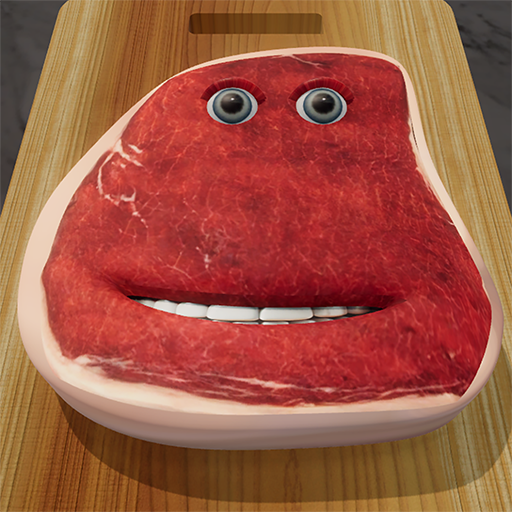
The Official Charlie the Steak Asset Archive

Stop using low-quality screen recordings. Access the original 2013 source files released by DynamicDust. Perfect for 3D printing, high-res meme creation, and Unity development.

185 MB • Includes Models, Audio, & Textures

 License Protocol:

You Can: Remix, Adapt, and Build (Non-Commercial).
You Cannot: Sell these models, monetize videos heavily, or upload ad-filled clones (like SLN Games).
Attribution: You must credit DynamicDust s.r.o. in your work.

For Meme Creators

.PNG (Images) / .MP3 (Audio)
CapCut, Premiere, Photoshop
Converted High-Res (Upscaled)

For Developers (Raw Source)

.PVRTC (Textures) / .CAF (Audio)
Unity, Xcode, Unreal Engine
Original Compressed (iOS Native)

For 3D Printing (STL)

.STL / .OBJ (Mesh)
Cura, PrusaSlicer
Non-Textured (Geometry Only)
File Explorer — Charlie_Assets_Master
📂 Inside the Archive
📦 Charlie_Assets_Master/
├── 📁 3D_Models/
│   ├── 📄 charlie_base_mesh.fbx (The Steak)
│   ├── 📄 torture_tools.obj (Hammer, Knife, Blowtorch)
│   └── 📄 tongue_rigged.fbx (Animation ready)
├── 📁 Audio/
│   ├── 🔊 sfx_sizzle.wav
│   ├── 🔊 sfx_scream_loop.wav
│   └── 🎵 music_vacation_loop.mp3 (The Meme Song)
└── 📁 Textures/
    ├── 🖼️ diffuse_raw.png
    ├── 🖼️ diffuse_medium.png
    └── 🖼️ diffuse_well_done.png

Developer Note: The “Pink Texture” Issue

The Problem: The original 2013 game used PVRTC (PowerVR) compression, which is native to iOS devices. If you import these directly into Android Unity projects, they will appear Pink or Black.

The Solution:

Download our “Creator Pack” above (We have pre-converted them to PNG).
Or, use a tool like TexturePacker to transcode PVRTC to ETC2 for Android support.

The Viral Loop: “Ei Ei Ei” (Vacation – Dirty Heads)

The Scream: Charlie’s Pain Vocal

The Sizzle: Cooking Sound Effect

The Cronch: Bite Sound

Import

File > Import > FBX > Select charlie_base_mesh.fbx.

Texture

Go to “Shading Tab.” Connect diffuse_raw.png to the Base Color node.

Rigging

The tongue_rigged.fbx comes with a basic bone structure. Enter “Pose Mode” to manipulate the tongue tip.

Lighting

Set “Specular” to 0.8 to achieve the “wet meat” look from the game.

Printing Charlie (FDM/Resin Guide)

Recommended Material: Red PLA (FDM) or Flesh-Tone Resin.
Infill: 15% (He is a solid slab, doesn’t need high infill).
Supports: REQUIRED. The tongue overhangs significantly. Use “Tree Supports” for best results.
Orientation: Print flat on the back (non-face side) to preserve face detail.
BLOCK 9: VIDEO EDITORS TOOLKIT

No 3D Skills? Use Video Overlays

Download pre-rendered Charlie the Steak videos with green screen backgrounds for CapCut and TikTok.

Idle Animation

Idle Animation

Talking Animation

Talking/Mouth Move

Format: GIF (Green Screen)

Hammer Hit

Being Hit by Hammer

Format: GIF (Green Screen)

Pro Tip: Use the ‘Chroma Key’ tool in CapCut to remove the green background and place Charlie anywhere in your video!

Need Something Else?

📱

Trying to FIX the game?

If you have the “Pink Screen” on your phone, you need the APK fix, not these assets.

Android Pink Screen Fix →
💻

Want to PLAY on PC?

Don’t build it yourself. Download the Stall Games Remake for the best experience.

Go to PC Version →
🍎

Looking for iOS IPA?

Get the official playable app file (IPA) here for your iPhone or iPad.

Go to iOS Page →
Scroll to Top